
Codex Usage Widget for Windows: Setup and Build Guide
A compact, movable Windows widget with a dark theme, weekly usage remaining, and a reset time.
C# + Windows Forms · Five-minute refresh · Remembered position
The widget
I built a movable Codex usage widget for Windows to keep weekly usage remaining and the reset time visible while I work. This post covers the small desktop utility, its behavior and the source/build instructions, with compatibility limits for an independent tool.
The project began as a notification-area app and evolved into a compact, dark widget that can sit near the taskbar or anywhere else on the desktop. The goal is deliberately modest: make the usage information easy to glance at without adding another full-size application window.
Just the information I wanted
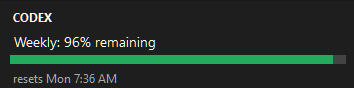
The visible widget contains four things: a Codex label, the weekly percentage remaining, a progress bar, and the reset time. The background is charcoal, the text is light, and the reset line is muted. The bar changes color as the remaining percentage falls.
It is a borderless, always-on-top window rather than a native taskbar extension. That keeps the implementation separate from the Windows shell. It also stays out of Alt+Tab.
Small changes that made it more useful
The first version started only in the notification area. That made it easy to miss, especially when Windows placed the icon in the overflow menu. The app was running, but it was not obvious where to find it. Opening the widget immediately made its behavior clearer.
Next came movement. Holding the left mouse button anywhere on the widget lets me drag it into place, and the app remembers that position between launches. A Reset position command returns it to the bottom-left work area.
The notification-area menu now includes a visibility toggle: Hide widget when it is visible and Show widget when it is hidden. It also provides manual refresh, an Open Codex command, optional startup with Windows, and Exit. Double-clicking the tray icon brings the widget back.
How it reads usage
The implementation is a C# Windows Forms app. It locates the installed Codex executable, starts its app-server over standard input and output, initializes the connection, and requests account/rateLimits/read.
The widget refreshes every five minutes. It does not collect a separate API key or copy authentication tokens. The installed Codex client handles its existing sign-in and can contact OpenAI to retrieve usage; this is not an offline meter.
Trying it and building from source
The current v1.4 project targets net6.0-windows. Its framework-dependent Windows x64 build requires the .NET 6 Desktop Runtime and a signed-in Codex installation. The repository README includes build commands, troubleshooting notes, and the --check health-check option.
Exit an older version before running an update. If startup with Windows was enabled, disable it in the old version and enable it from the new executable so the startup entry points to the right file.
Final thoughts
For me, the useful result is a quieter desktop workflow: a small, movable display with the information I wanted, available at a glance.
View Codex Usage Widget on GitHub for the source code, build instructions, and troubleshooting notes.