
I built this storage appliance to make three common VMware Cloud Foundation lab services easier to deploy and maintain: SFTP backup targets, a private Harbor registry, and an authenticated publisher for subscribed vCenter Content Libraries. The result is a reusable Ubuntu 24.04 LTS OVA with a single management interface and separate storage for each service.
A special shout-out to William Lam and his VCF Infrastructure Services (VIS) Appliance for VCF 9.1 Lab/PoC, which helped inspire this project. I did not need every service included in his appliance, but his work got me thinking about building focused appliances around the services and workflows I wanted in my own environment.
Update for version 1.2.0
Version 1.2.0 refreshes the deployable OVA and signed in-place update package with the latest SFTP account-management improvements.
- Generated SFTP passwords are now 19 characters, remain cryptographically secure, and satisfy clients that reject longer generated values.
- The generated password can be revealed or copied before an account is saved. Saved passwords remain non-retrievable and can only be replaced by generating or entering a new value.
- Enable, Disable, and Remove controls now appear directly beneath each account status label. Removal requires the account to be disabled first and preserves its backup data.
- Harbor, Content Library, appliance management, signed updates, and the rest of the version 1.1 feature set remain included.
- The Deployment, Administrator, and Troubleshooting guides have been updated for version 1.2.0.
The exact 1.2.0 OVA passed 167 Linux unit and security tests, OVF manifest and signed-checksum verification, VMware OVF Tool checks, and an import and first-boot smoke test with standard login enforced. The signed 1.2.0 in-place update was also applied to the live appliance and verified to preserve its existing configuration and service data. Version 1.0.3 remains the most recently completed full guided-setup and end-to-end service qualification baseline.
The appliance is designed for a clean deployment. It does not contain my lab credentials or service data. The owner supplies the hostname, DNS domain, DHCP or static IPv4 settings, DNS and NTP servers, administrator credentials, recovery credential, Harbor bootstrap credential, and initial management-network policy during the vCenter deployment workflow.
Download the appliance and documentation
The public project is available at github.com/raleyj/storage-appliance. Use the version 1.2.0 release for the qualified OVA, checksums, signed metadata, documentation, and reassembly tools.
- OVA part 1 and OVA part 2 — download both numbered files.
- Windows PowerShell reassembly script or Linux/macOS reassembly script.
- Signed in-place update package.
- Metadata and documentation archive — OVF descriptor and manifest, signed checksum, public verification key, SPDX SBOM, exact-artifact smoke-validation records, and the current Deployment, Administrator, and Troubleshooting guides.
- Release asset checksums.
- Reconstructed OVA SHA-256:
6d153a7bc0839c66e44f84563a5f606e3935aafb36b5d20079fa3f8635057d15.
The OVA is approximately 2.1 GiB, which is larger than GitHub’s individual asset limit. The reassembly scripts join the two numbered files and verify the final SHA-256 value before deployment.
What is inside
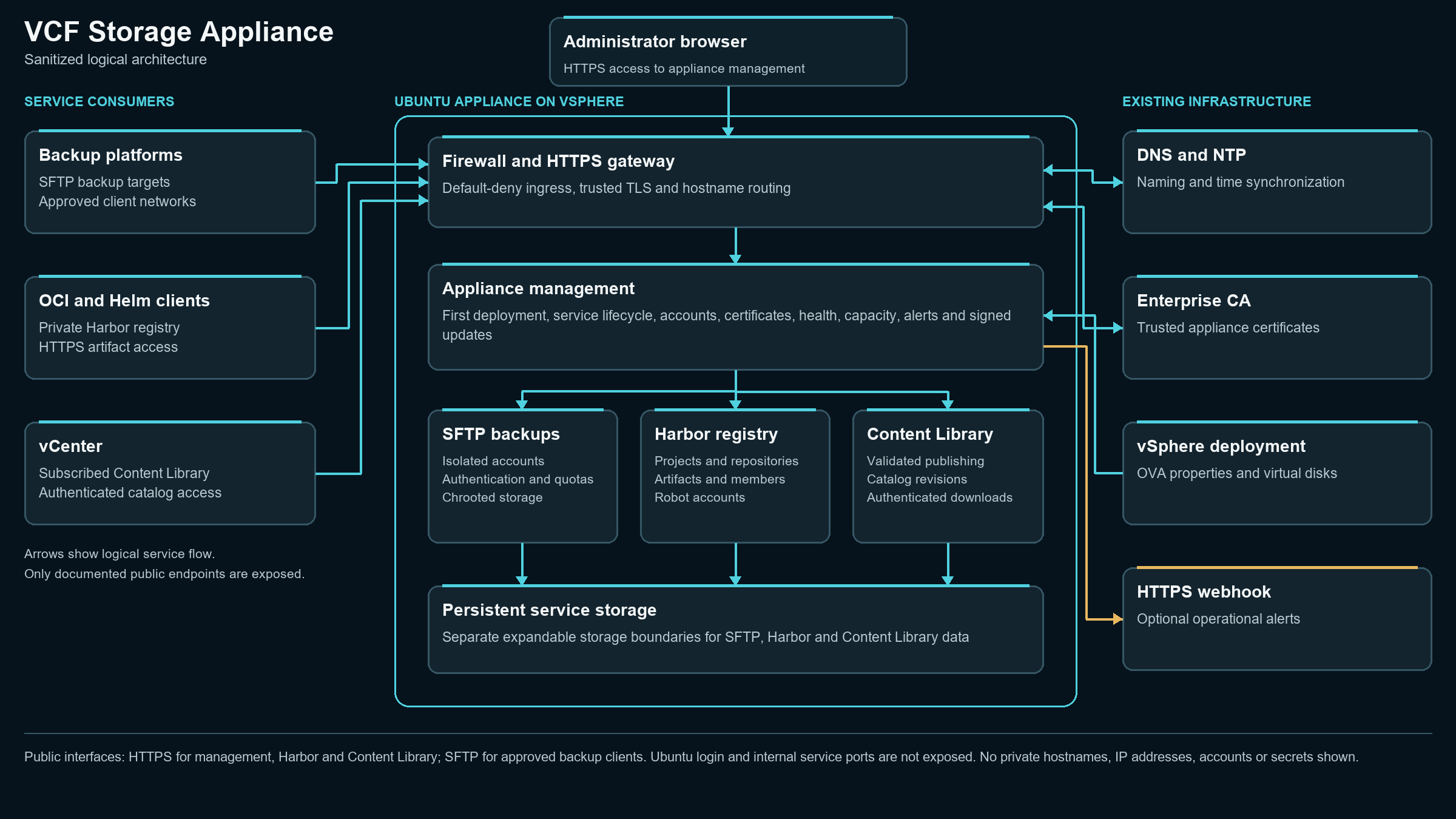
The appliance uses Ubuntu Server 24.04 LTS as the host and runs the SFTP, Harbor, and Content Library workloads as isolated services. Administrators use the HTTPS /admin/ interface for first deployment, daily management, service status, appliance health, certificates, updates, storage, activity history, and administrator accounts.
The three workloads use separate service filesystems. The host applies a default-deny firewall to management and container ingress, and service endpoints are published only through the intended ports and names. The design does not expose an Ubuntu login, host SSH service, web terminal, or generic shell API.
From OVA import to running services
- Download both OVA parts and a reassembly script, reconstruct the OVA, and verify its SHA-256 value.
- In vSphere Client, choose Deploy OVF Template, upload the reconstructed OVA, select the destination compute and storage, and map the network adapter to the intended management port group.
- Enter the appliance and VM name, hostname, DNS domain, DHCP or static IPv4 selection, prefix, gateway, DNS servers, NTP servers, administrator credentials, restricted-console recovery credential, Harbor bootstrap credential, and permitted management network.
- Power on the VM and open
https://<appliance-fqdn>/admin/. Replace the initial certificate with a trusted certificate for the appliance and service names. - Use the guided first-deployment workspace to select and initialize SFTP backups, Harbor Registry, Content Library publishing, or the combination required for the environment.
- Review Appliance Status, confirm DNS and time synchronization, validate the firewall and certificate, and then configure client accounts or service content.
The guided workflow initializes only the selected services. Day-two pages remain available for service lifecycle, capacity, account, network, certificate, update, and recovery tasks.
Three included services
SFTP backups
The SFTP service provides a backup target for vCenter and other approved clients. Administrators create named accounts, select password or SSH-key authentication, set per-account quotas, add approved client subnets, and control account state from the appliance interface. The page also shows host-key information, storage usage, recent activity, and service health.
SFTP users are restricted to their assigned storage and cannot obtain a shell. Changes to authentication and quotas use a controlled service workflow, and the interface presents accounts and status as management cards and tables instead of exposing raw configuration data.
Harbor registry
The Harbor service provides a private OCI registry for container images and Helm charts. The appliance interface manages projects, quotas, members, repositories, artifacts, robot accounts, service lifecycle, and registry storage without requiring a second administrative portal for the supported workflow.
Clients authenticate to the registry endpoint and can push or pull OCI content according to project permissions. Version 1.2.0 supports the private-registry functions needed for the lab, including resumable uploads.
Content Library publisher
The Content Library service publishes ISO, OVF, and OVA content through an authenticated VCSP v2 catalog. Administrators can upload new items or update an existing item using a stable item key, review current files, inspect publication jobs, rebuild metadata, validate the catalog, and rotate the reader credential.
vCenter subscribes to the HTTPS library endpoint using the reader account. Anonymous downloads are denied, and range requests are supported so large transfers can resume. The item inventory shows what is currently published instead of requiring administrators to inspect the service filesystem.
Appliance management and recovery
The administration interface follows the same light and dark visual design used by my other lab appliances. Header navigation separates SFTP Backups, Harbor Registry, Content Library, HTTPS Certificate, and Appliance Status. The administrator menu provides Appliance Management, Appliance Updates, and Admin User Management.
Appliance Management controls identity, timezone, DHCP or static networking, DNS, and NTP. Appliance Status summarizes identity, active addressing, resolver state, time synchronization, service health, storage, HTTPS certificate validity, firewall state, and active alerts. Administrators can download a support bundle, refresh status, restart the appliance, or initiate a controlled shutdown.
Signed in-place updates allow the software to advance without redeploying the OVA. The appliance verifies the release package before staging and installation and retains a rollback path to the previous software release. If web administration is unavailable, a restricted VMware console menu provides recovery for the web administrator without exposing a general-purpose shell.
Security and operational boundaries
Management access is intended for explicitly approved networks. SFTP client networks are maintained separately so a backup client does not automatically receive access to the administrative interface. Credentials supplied through the OVF properties are masked and can be cleared after initialization.
Use trusted DNS records and a CA-issued HTTPS certificate for the appliance, Harbor, and Content Library names. Keep NTP reachable from the deployed subnet because certificate validation, activity history, and authenticated clients depend on accurate time. Monitor the status page for service, storage, certificate, DNS, NTP, and firewall alerts.
What was actually validated
The exact 1.2.0 OVA passed 167 Linux unit and security tests, OVF manifest checks, signed-checksum verification, VMware OVF Tool validation, import, and first boot. Standard login was enforced and development auto-login was disabled.
The full guided service workflow was not repeated for 1.2.0. The signed live update was verified on the running appliance without loss of configuration or service data. Version 1.0.3 remains the most recently completed full service qualification baseline. That baseline covered DHCP first boot, guided initialization, reboot persistence, SFTP upload and download, quota and authentication enforcement, Harbor private projects and OCI push and pull, Content Library reader authentication and HTTP range support, service lifecycle controls, firewall rollback, restricted-console recovery, and clearance of OVF bootstrap secrets.
The release metadata archive includes the exact-artifact smoke-validation record, signed checksum material, SPDX SBOM, and updated 1.2.0 guides for deployment, administration, and troubleshooting.
Current release scope
Version 1.2.0 is the current general-availability build. It targets VMware vCenter and ESXi 9.1.0 with Ubuntu Server 24.04 LTS as the guest platform. SFTP backups, private Harbor registry management, authenticated Content Library publishing, appliance administration, signed updates, and restricted-console recovery are the supported core capabilities.
Start with the deployment guide in the metadata archive, verify the reconstructed OVA, complete the appliance checks, and enable services one at a time. The goal is a repeatable storage-services deployment that becomes part of the owner’s environment without inheriting another lab’s credentials or data.