
Security Appliance 1.0 GA brings identity, key management, trusted access, proxy services, and appliance operations together in a single deployable VMware vSphere OVA. It is designed for labs and infrastructure teams that want these services to behave like one managed appliance instead of a collection of unrelated containers.
A special shout-out goes to William Lam and his VCF Infrastructure Services (VIS) Appliance for VCF 9.1 Lab/PoC. I did not need every service included in VIS, but seeing William package useful infrastructure services into a purpose-built virtual appliance inspired me to explore the same approach for the security services I wanted in my lab. That idea became the starting point for Security Appliance.
The project combines a focused administrative interface with six coordinated services: a management application, Nginx reverse proxy, Squid forward proxy, PostgreSQL, Keycloak, and a KMIP key-management service. The appliance handles first boot, certificates, service credentials, firewall policy, networking, updates, diagnostics, and recovery as one system.
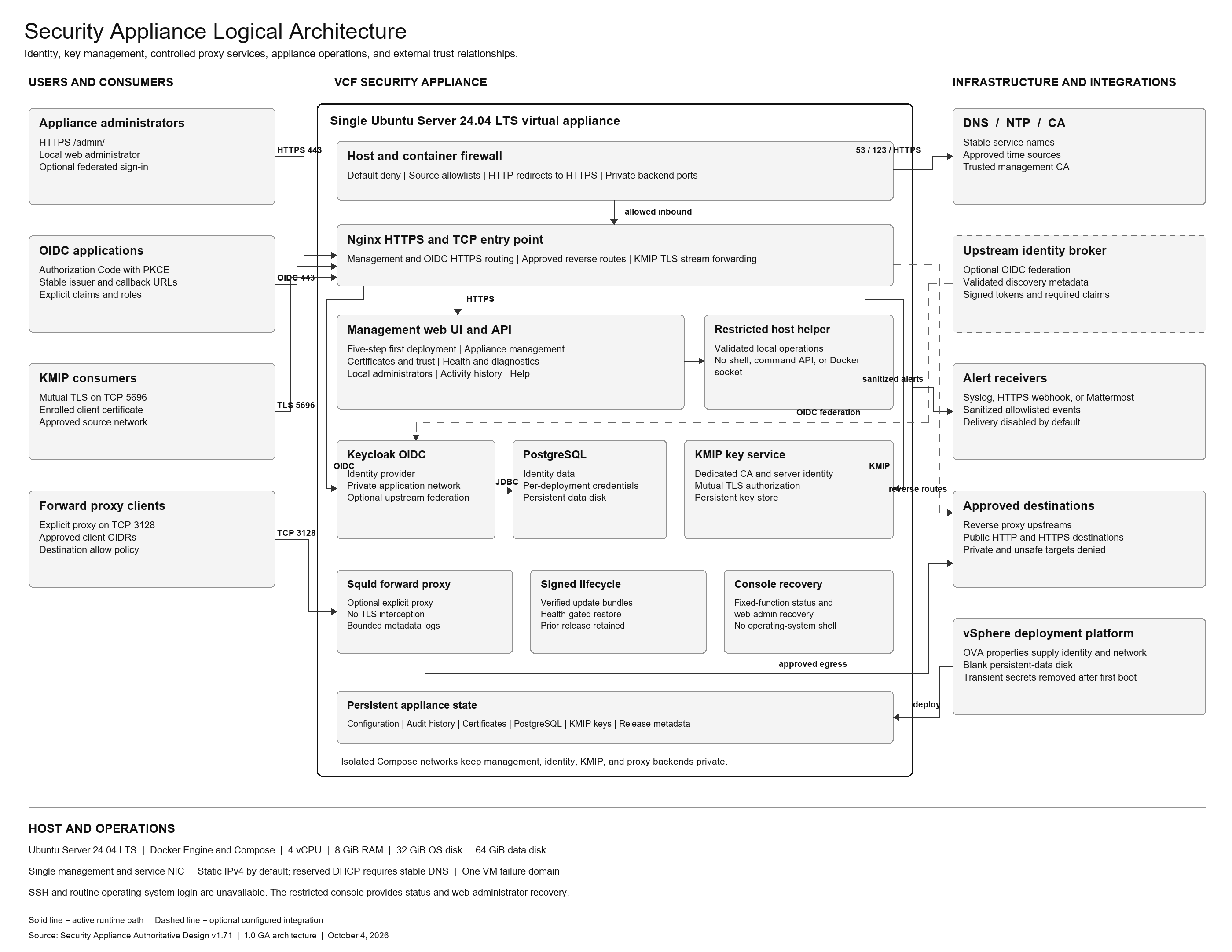
Logical architecture
The appliance separates administration, identity, key management, controlled proxy services, lifecycle operations, recovery, and persistent state within one deployable Ubuntu virtual machine. External connections are limited to defined trust relationships and approved listeners.
A guided first deployment
The first sign-in opens a five-step deployment workflow. Administrators prepare the appliance, configure identity, configure key management, review proxy behavior, and complete deployment only after the required readiness checks pass.
The VMware deployment wizard collects the initial hostname, domain, IPv4 settings, DNS and NTP sources, management networks, service names, and three separate credentials. Password fields are masked and blank in the sealed OVA. First boot creates the data filesystem, generates service credentials, prepares container networks, builds firewall policy, creates temporary TLS material, and starts the appliance services.
Identity with Keycloak and OIDC
Keycloak provides the appliance identity layer. The management interface exposes the information needed to register applications, including the issuer, callback address, realm, and WebAuthn relying-party identity. The design supports Authorization Code with PKCE, role and group claims, coordinated logout, and external identity-broker federation while retaining a separate local recovery administrator.
Keycloak and PostgreSQL run on private container networks. Their backend ports are not published to the appliance network, and the public identity route is selected by hostname through Nginx.
KMIP key management for virtual infrastructure
The KMIP service provides an external key-provider workflow for VMware vCenter and other KMIP consumers. The appliance maintains its own root and issuing certificate hierarchy, signs consumer-generated certificate requests, and publishes the CA chain needed to establish mutual trust.
Private keys stay with the systems that own them. A vCenter integration begins with a CSR generated in vCenter, continues with certificate signing on the appliance, and ends with an explicit source-network policy for TCP 5696. The service page shows trust material, enrollment status, service controls, functional tests, and KMIP-specific activity.
Reverse and forward proxy services
Nginx provides the HTTPS entry point for the appliance. Plain HTTP redirects to HTTPS, management requests route to the private administration service, and identity requests route to Keycloak by hostname. Backend services remain isolated from direct client access.
The optional Squid forward proxy gives approved client networks controlled outbound HTTP and HTTPS connectivity. Administrators can restrict source networks and destination domains. Private, loopback, link-local, and appliance destinations are filtered, and the proxy operates without TLS interception.
Certificates and trust
The appliance generates its management certificate request locally so the private key never leaves the VM. Administrators can import the signed leaf certificate, intermediate certificates, and trusted CA chain from the web interface. A trust inventory shows the public certificate identities used by management and KMIP, and the corresponding public CA chains can be downloaded for consumers.
Operations from one interface
Each service page owns its controls, functional test, and scoped connection activity. The Health Status page brings together identity, networking, DNS, time synchronization, storage, service readiness, certificate status, firewall state, and active alerts.
The administration menu includes appliance configuration, signed updates, local administrator management, password changes, and activity history. Alerts can be delivered through syslog, an HTTPS webhook, or a Mattermost incoming webhook. Support bundles and visible activity are sanitized to avoid exposing credential-related data.
Signed updates and guarded recovery
Updates are delivered as signed appliance bundles. The appliance verifies the release signature, manifest, and every file digest before applying an update. It limits changes to approved appliance paths, runs health checks after installation, and retains a qualified prior application state for guarded restoration.
The VM console is a fixed-function recovery surface rather than an operating-system shell. It can recover an existing web administrator, display service and firewall status, and restart the appliance. Recovery attempts are throttled and recorded.
Security Appliance 1.0 GA
The GA image was sealed from a validated build, stripped of deployment-specific state and credentials, written across free OS blocks, and paired with a fresh blank data disk. A clean import then passed standard sign-in, static networking, DNS and NTP health, firewall isolation, all six service tests, trusted certificate enrollment, HTTP-to-HTTPS redirection, proxy policy, signed update and restore, reboot persistence, console recovery, and VMware vCenter KMIP encryption.
Documentation and source
The public security-appliance GitHub repository now includes the environment-neutral documentation set for the 1.0 GA release:

The repository also provides the reviewed 1.0 GA source package, security model, deployment summary, test suite, public-content manifest, and OVA checksum.