
Configure Microsoft CA Integration in VCF 9
Configure VCF Microsoft CA integration for a homelab. Review connection inputs and why CA settings are needed at management and instance levels.
Overview
This guide connects an existing Microsoft certificate authority to VCF Fleet Management. My lab already has a Windows enterprise root CA, a VMware certificate template and web services; the steps below configure the CA connection at management and VCF-instance levels.
CA inputs and permissions
| Input | Prepare |
|---|---|
| CA URL | Reachable HTTPS enrollment endpoint and correct DNS/certificate trust from the VCF components. |
| Service account | Dedicated account with the required CA privileges and Read/Enroll permissions on the published VMware template. |
| Template | The actual published template name; verify subject/SAN and server-authentication settings against the VCF release procedure. |
| CA services | Complete the required CA role and Web Enrollment setup; VCF integration requires the documented IIS authentication configuration. |
| Scope | Configure VCF Management and each VCF instance that will issue certificates; one successful scope does not configure the others. |
Use Basic Authentication only over trusted HTTPS for the documented enrollment integration. Broadcom’s CA troubleshooting guide covers template permissions, IIS authentication and trust failures. The prerequisite KB also warns that creating the template alone is insufficient.
For the documented 9.0/9.0.1 VCF-instance username parsing issue, use the UPN form such as svc-vcf@example.com: CA username-format KB.
Use a dedicated AD service account with Domain Users membership. The CA security settings and template security settings are separate:
| Security scope | Select | Leave deselected |
|---|---|---|
| CA properties in certsrv.msc | Issue and Manage Certificates; Request Certificates | Read; Manage CA |
| Published VMware template in certtmpl.msc | Read; Enroll | Full Control; Write; Autoenroll |
These are the selections in Broadcom’s VCF 9 certificate-management privileges procedure (reviewed August 28, 2026). Deselected does not mean adding an explicit Deny rule. Check inherited permissions and follow the procedure for your release; do not grant broad administrator access as a substitute.
There are a ton of blogs out there on how to complete this deployment, here is an example. Since there are so many other blogs that walkthrough this deployment, I am going to skip ahead and show how to configure this certificate authority with the VCF fleet manager.
Configure the Microsoft CA connection
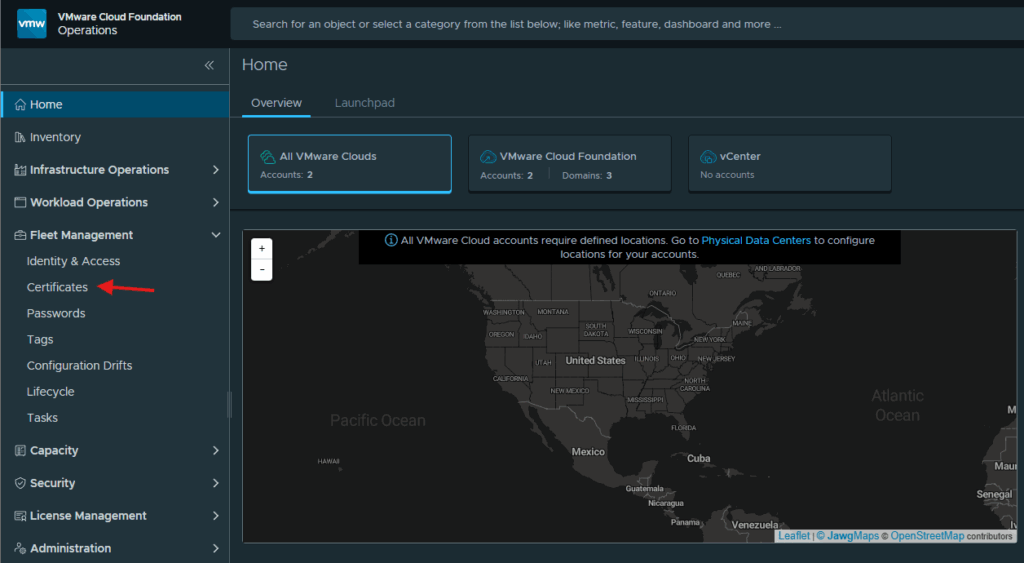
Login to the VCF Operations web gui, expand Fleet Management and click Certificates
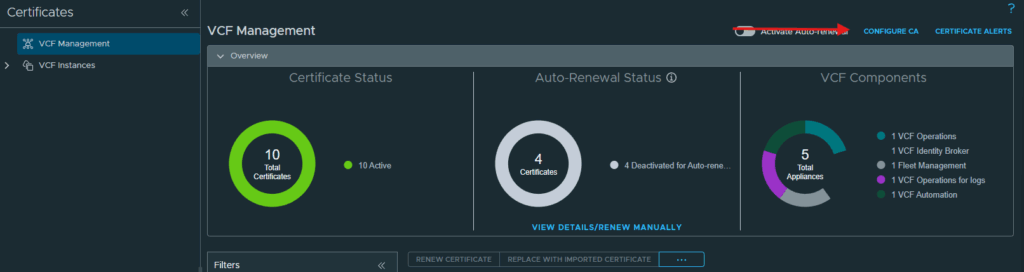
Click the Configure CA at the top right corner for VCF Management.
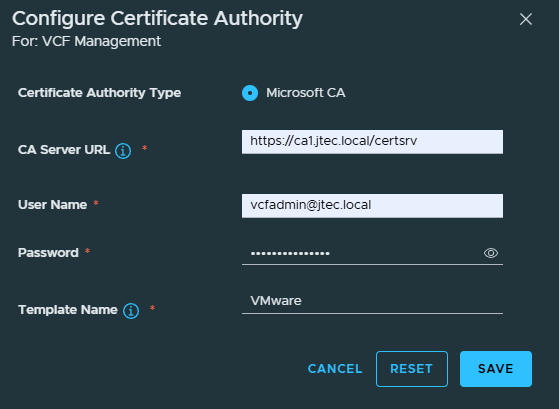
The only option presented at this level is Microsoft CA, enter in the URL, username, password and template for your certificate authority and click Save.
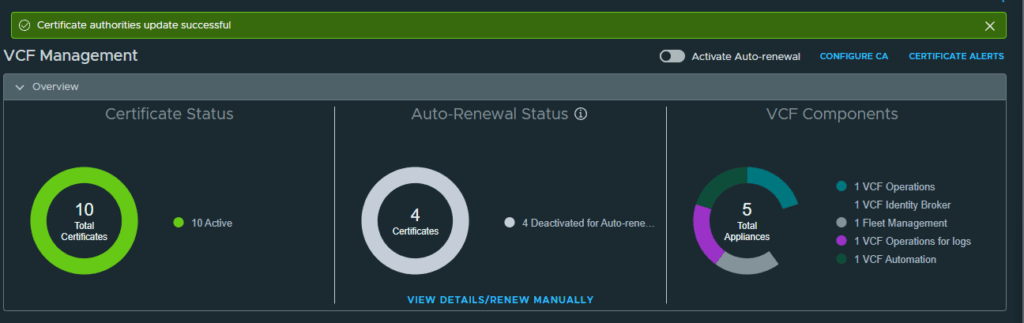
A notification will appear at the top if the connection is successful.
Configure each VCF instance
I noticed during my initial certificate deployment that configuring the CA at the VCF Management level only allows for replacing certificates on the appliances at this level with Microsoft CA certificates. You will need to configure CA at each instance level as well to be able to replace the certificates for those appliances.
You can return to my main VCF Lab page to follow along with this deployment.