
I built this NetBox appliance to make infrastructure inventory easier to deploy and maintain. What began as a homelab deployment is now a portable OVA that others can import into vSphere, initialize with their own settings, and connect to their own systems.
The connector software is included; my lab connections are not. Every deployment starts with an empty inventory and no configured external connections. The owner supplies their own network settings, administrator password, credentials and trust fingerprints.
Updated 7 October 2026: NetBox Appliance 1.2.0 is available. This release adds VCF Identity Broker SSO setup inside NetBox, optional VMware interface enrichment and a refreshed Ubuntu patch baseline. The final OVA passed a fresh vSphere deployment, interactive setup, HTTPS login and reboot checks, with additional synthetic SSO and isolated backup tests.
Download the appliance and Word guides
The public project is available at github.com/raleyj/netbox. Use the version 1.2.0 release for the OVA, checksums and Word documentation.
- Download the NetBox OVA — approximately 1.68 GiB (1,807,994,880 bytes).
- Deployment Guide — Word: numbered instructions from import through first login and connector setup.
- Build Guide — Word and Release Verification — Word.
- Appliance source bundle: use this ZIP for appliance code; GitHub’s automatic source archives contain the repository documents.
- SHA-256 checksums: verify the downloaded OVA before importing it.
What is new in version 1.2
The biggest change is owner-configurable VCF Identity Broker OIDC SSO. Sign in as a NetBox superuser and open Appliance > Single sign-on. Register the client with your broker, enter its settings, independently verify and approve the broker certificate fingerprint, and map an exact allowed directory UPN to an existing active NetBox user. Test the configuration, then save and enable SSO. No separate human appliance-admin password is required.
The browser redirects to your broker for authentication and returns to NetBox, where the approved identity uses the existing local account permissions. SSO does not automatically create users or grant additional roles. The interface shows Local login or IDB login, and local password access remains available for recovery. SSO starts disabled in the OVA, with no preconfigured broker, client secret or owner mapping.
The setup Test checks discovery, signing keys and the existing-user mapping; finish an actual browser sign-in to verify the client secret and directory login. Backups now include the SSO configuration in the encrypted archive.
Version 1.2 also adds optional VMware NIC/MAC inventory and controlled association of existing NetBox IPs to VM interfaces. This helps connect an IP record to the VM interface using it while leaving DNS ownership intact. Preview the changes before enabling application. The vCenter section below explains the eligibility checks.
What is inside
The appliance packages Ubuntu 24.04 LTS, NetBox 4.7.0, PostgreSQL 18, Valkey 9.1 and the required container images. It includes a consistent dark/light interface, superuser-only connector administration and a Single sign-on setup page inside NetBox. First boot does not need to download packages or container images from the internet.
The default virtual hardware is 4 vCPU, 8 GiB RAM, a 64 GiB system disk and a separate blank 100 GiB data disk. Administrators access NetBox through HTTPS. SSH is disabled, and the database and cache are not published as external services.
Logical architecture
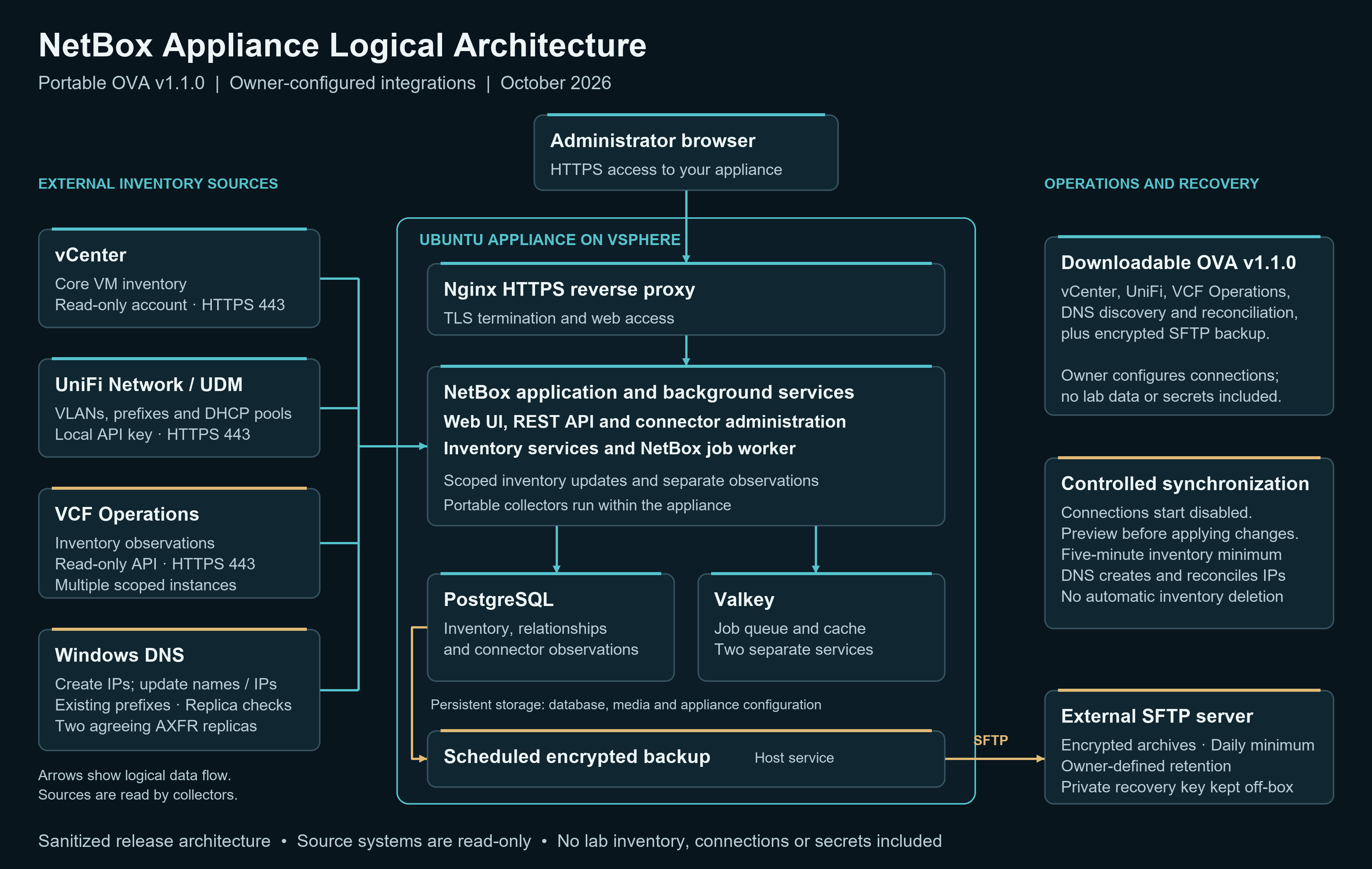
VCF Operations adds inventory observations alongside the core VM records maintained by vCenter. Authoritative DNS discovery can create missing NetBox IP records, update names and reconcile unambiguous address moves within existing prefixes. These capabilities are now included in the portable OVA.
The portable DNS collector runs inside the appliance and uses owner-authorized zone transfers (AXFR) from two agreeing DNS replicas. This differs from the domain-controller scheduled task used in my live lab. No domain-controller script, lab account, private hostname or connection secret is carried into the OVA.
From power on to a working NetBox instance
- Verify the checksum and import the OVA using vCenter’s Deploy OVF Template wizard.
- Map the Management network to your port group and confirm the supplied disks and resources.
- Power on and open the VM console. Enter your FQDN, static IPv4 settings or DHCP selection, DNS, NTP and permitted management source network.
- Create your own administrator password. The appliance initializes storage, generates unique secrets and an initial certificate, prepares the database and starts NetBox.
- Sign in over HTTPS as admin, create your first site and configure only the connectors you need.
This is an interactive first-boot setup, not an unattended deployment with a shared factory password. After the owner answers the console prompts, initialization and application startup are automatic. The initial self-signed certificate should be replaced with a trusted certificate before its 90-day expiry.
Five included external connectors
vCenter inventory
A dedicated read-only vCenter account supplies cluster and VM inventory, including VM identity, name, CPU, memory and power state. Separate named connections support multiple vCenter instances. In v1.2, optional interfaces collection adds NIC and MAC inventory using stable VM UUIDs and NIC device keys. Optional associate_guest_ips then associates existing NetBox IP records to eligible connected VM interfaces. It requires a powered-on VM, running VMware Tools, an unambiguous NIC and an existing global-VRF IP within an existing prefix. Conflicts are held for review. It does not create guest IP records, change DNS names, select primary IPs, infer VLANs from port groups or create disk records.
UniFi VLANs and DHCP pools
The UniFi connector reads VLANs, prefixes and configured DHCP pool ranges through the local integration API. This lets UniFi remain the authority for network definitions while NetBox documents them. It does not change router configuration or import individual DHCP leases and client IP addresses.
DNS reconciliation
DNS reconciliation can update names on existing enrolled IP records using reverse records and matching forward answers. Version 1.1 also includes authoritative discovery: configure two DNS replicas, authorize zone transfers from the appliance and select existing NetBox prefixes. When the replicas agree, the connector creates missing IP records, overwrites DNS names and reconciles unambiguous address moves within that scope. Conflicting or incomplete source data stops application. It does not write A/PTR records into DNS or automatically delete NetBox IP records.
VCF Operations inventory observations
Connect multiple VCF Operations instances using separate named connections, read-only accounts, certificate trust and adapter scopes. The connector stores VM, host and cluster observations separately from the core vCenter inventory. This provides visibility across Operations instances without allowing one source to overwrite the VM inventory owned by vCenter.
Encrypted SFTP backups
The backup connector captures the database, media, configuration and secrets, encrypts the archive for the owner’s public recovery certificate, and uploads it to an external SFTP server. It verifies the SSH host key and checks the uploaded file by reading it back. Configurable retention applies only to this deployment’s authenticated archives. Keep the matching private recovery key off the appliance and test restoration separately.
Preview before applying changes
Connections start disabled and in preview mode. The administrator supplies settings and credentials, enables preview collection, reviews the result, and then permits application. Inventory and DNS intervals can be as short as five minutes; SFTP backups have a one-day minimum. Source disappearance does not automatically delete NetBox inventory, and existing conflicts can require review.
The connector page shows the last attempt, last success and result. This release does not send external failure alerts, so monitoring those results remains an operational responsibility.
What was actually validated
The exact v1.2.0 OVA was imported into vSphere as a fresh VM. Validation covered interactive first boot using DHCP, six healthy containers, HTTPS administrator login, connector administration, reboot persistence and local console sign-in. Twenty-four runtime connector/access-control fixture checks, fourteen local SSO security/configuration checks and nine end-to-end checks against a synthetic OIDC provider passed. The OIDC checks covered approved-user mapping, rejection of an unapproved user and an invalid nonce, secret redaction, and local-login fallback. Targeted exported-disk and metadata privacy checks found no private markers. Static networking and Workstation were not requalified for this version.
Five isolated backup checks covered preview without upload, rejection of an incorrect host key, encrypted upload/readback verification, archive decryption including SSO configuration, and a separate PostgreSQL restore. This does not constitute a full replacement-VM recovery test. Connectors and SSO were tested with controlled fixtures; validate your own external endpoints and complete a real directory browser sign-in during onboarding.
The Ubuntu host was patched from the configured signed repositories and tested on kernel 6.8.0-146-generic. Version 1.2 also fixes SSO bridge request validation and socket startup permissions. Administrators should continue maintaining OS and container updates after deployment.
Release scope
Version 1.2.0 is a fresh-deployment release, not an automated in-place updater. It is an unsigned community appliance built around NetBox and netbox-docker, not an official NetBox or VMware appliance. Earlier releases remain available on GitHub for historical reference.
Start with the step-by-step deployment guide, complete the core deployment checks, and add integrations one at a time. The goal is a repeatable deployment that becomes your own inventory system without inheriting someone else’s lab.