
My UniFi 10GbE Homelab Network Design
Explore a UniFi 10GbE homelab network design with rack and distribution switches, physical servers, Intel NUCs and dedicated infrastructure hosts.
Overview
My UniFi 10GbE homelab network connects physical servers, Intel NUCs and infrastructure services through rack and distribution switches. This post explains the cabling and topology I chose, with 10GbE SFP+ links inside the lab and a 1Gbps FiOS internet connection.
Physical network topology
The diagram below shows how I connected everything together, I have a distribution switch as well since this lab is in my basement with additional ethernet connections for the various rooms that have IoT devices in them. I also have a single WiFi access point just in case I need a wireless connection to my lab but that is not needed.
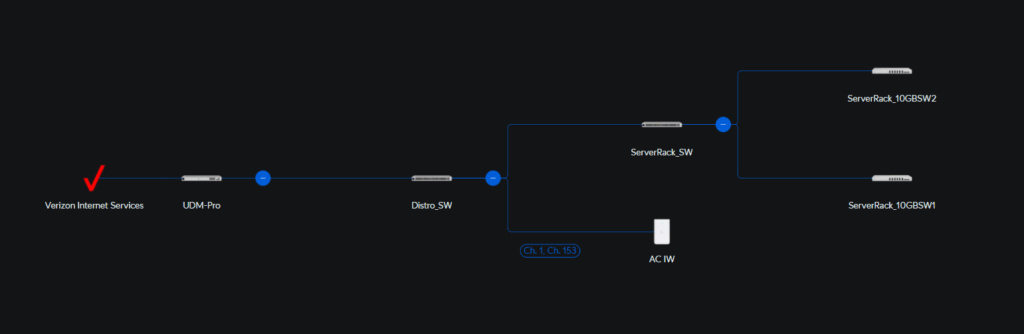
As you can see in the diagram above, I have a 48 port switch serving as my top of rack (ToR) for the entire rack and that has 2 SFP+ connections that serve as the uplinks to my distribution switch which is also connected to the dream machine pro router with 2 SFP+ connections for all my routing. This ToR switch will also provide the connections for my Avocent KVM and 2 of the Intel NUCs that will serve as my Lightweight Directory Access Protocol (LDAP)/Domain Naming System (DNS) servers for the lab.
Server and infrastructure connections
The 2 10GB SFP+ switches will serve as the main switches for all my VMware Cloud Foundation (VCF) environment and I have connected my custom desktops, physical servers to these switches. I also am going to have at least 2 Intel 12th generation NUCs connected to these switches using a Dual-port 10GBASE-T Gigabit Ethernet Thunderbolt Adapters by SonnetTech.
https://www.sonnettech.com/product/twin10g-tb3/overview.html
The 2 Intel 12th generation NUCs will be used as infrastructure hosts to host various virtual machines that I deploy in support of my VCF environment. Some of the virtual machines are Certificate Authority, IPAM Server, Active Directory Federated Services, Ubuntu desktop to name a few, we will get into the usages of these systems later on.