
After building the 2 domain controllers for my environment, I determined all the IPs and hostnames for the majority of the servers I would need to build my lab and realized that was a decent amount of A records that I had to create.
So instead of manually entering them all in the server GUI, I searched around a bit and with some help from ChatGPT I built a simple PowerShell script that will read a DNSEntries.csv file and used the dnscmd.exe command to create the A and PTR records for all the hosts.
Here is a snippet of what that script looks like:
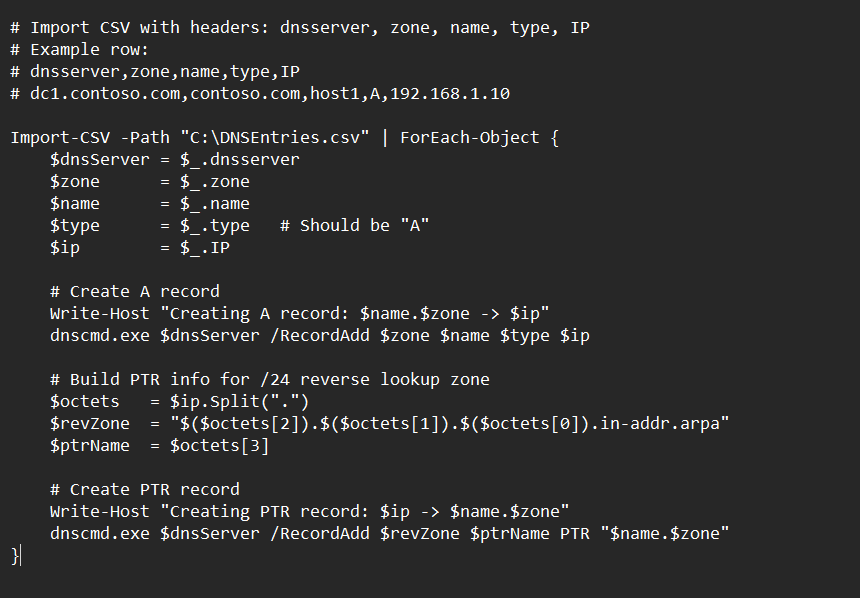
I then uploaded this PowerShell script and the csv file with all hostname up to my domain controller and let the script do the rest of the work. Saved me a good amount of time considering I had roughly 75 names on that list.
You can also run this script remotely if you would like but it requires some additional configurations on your management workstation as RSAT DNS tools are not installed by default on Windows 11 and unless your joined to the lab domain on that system you would get access denied errors as well. Since I don’t need to run this script more than once, it wasn’t feasible for me to configure my management workstation for this.