
I briefly discussed domain servers in a previous post and mentioned that I would be using Windows Server OS to host my domain along with certificate authority and federated services in the future. This is just a personal preference as I have almost as much experience with Windows OS as I do with VMware products.
VMware Photon OS can also be used and if you are interested in using this, then check out this blog below for more information:
https://virtualg.uk/setting-up-a-dns-server-with-photonos/
As for my Windows Servers, I am going to have 2 Intel NUCs serve as my physical domain controllers for my network just so I have redundancy and really because I have the hardware available to do it so why not.
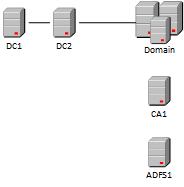
You can see in the image above, this is a very basic deployment of Active Directory and those domain controllers will also have the DNS role installed. If you are not familiar with Windows Server AD/DNS then check out this blog below for a step-by-step guide.
https://www.itechguides.com/how-to-setup-a-windows-server-2022-ad-domain-step-by-step/
Once I have built my domain, I will spend some time figuring out the IPs and hostnames for all the virtual machines I will need to complete a VMware Cloud Foundation deployment and the additional components I need to support that deployment. A basic list of hostnames that will be needed are:
- Certificate Authority
- SFTP Server
- VCF installer appliance
- VCF offline depot (optional)
- vCenter appliance
- NSX appliance
- Fleet Operations appliance
- VCF Operations appliance
- VCF Operations Collector appliance
- VCF Automation appliance
- VCF Operations for Log appliance
- SDDC Manager
- NSX Edge nodes
- vSphere Hosts