
My VCF Homelab Architecture Update — October 2026
The September architecture, updated October 23, 2026 with the October 22 inventory: shared infrastructure, two-node vSAN with a dedicated witness host, physical VCF 9.1.1 domains, NSX networking, and Private AI Services through VCF Automation.
October 6 update: ROBO1 behind a simulated WAN
The lab now includes a remote-office test site built around the ROBO1 ESXi host on an Intel NUC13ANHi7. An Ubuntu WAN simulator takes over the former WinDepot role and provides the routed path between the central lab and ROBO1. The VCF Offline Depot Appliance continues to run in the infrastructure cluster.
The logical path is central lab / UDM Pro → WAN Ubuntu → ROBO1. Physically, the WAN simulator and ROBO1 connect to separate ports on the USW Pro 48 server-rack switch. Ubuntu uses one physical Ethernet port at 1 GbE with tagged interfaces in a router-on-a-stick design.
The simulator applies 40 ms of delay in each direction, adding approximately 80 ms to round-trip latency for traffic that crosses the simulated WAN. Its administrative access bypasses the delay. Traffic that stays within the remote site stays local.
The routed site networks cover ESXi management, vMotion, host TEP, VNA management, and DTGW external connectivity. Overlay workload traffic still depends on the selected NSX routing path. This gives the lab a remote-site test platform without moving the three physical MS-A2 workload hosts behind the simulator; those hosts remain in the central lab.
The WAN simulator is an Intel NUC13ANHi7 with a Core i7-1360P (12 physical cores / 16 threads), 64 GB RAM, a Samsung 990 EVO 2 Tb NVMe drive, and a 512 Gb SATA SSD. The updated physical and logical architecture diagrams show the remote-site path alongside the existing VCF environments.
Overview
When I published my November 2025 hardware inventory, the lab was in the middle of a move to six Minisforum MS-A2 systems. The hardware list explained what I owned and the roles I expected those systems to fill. Since then, the environment has matured into a more deliberate architecture with clearer boundaries between physical infrastructure, shared services, nested testing, VCF management, and VCF workloads.
The biggest change is that the lab is no longer best described as a collection of hosts. It is now a set of purpose-built platforms connected through a defined 10 GbE topology. Each platform has a specific job, and that separation makes it easier to rebuild, test upgrades, compare VCF releases, and troubleshoot without disrupting everything else.
What changed since November 2025
- The physical VCF management domain grew from three to four Minisforum MS-A2 hosts.
- The three-host physical workload domain now uses MS-A2 systems equipped with NVIDIA RTX 4000 SFF Ada GPUs with 20 GB of VRAM.
- The Dell PowerEdge R650 became the dedicated nested VCF platform for VCF 5.2, 9.0, and 9.1 environments.
- The two MSI Pro B760M desktops now form a dedicated infrastructure cluster for shared lab services.
- The NUC systems now provide three physical Windows infrastructure services, the IS3 ESXi witness appliance host, an Ubuntu WAN simulator, and a separate ROBO1 ESXi host.
- The network now uses separate distribution, server-rack, and aggregation switching roles with 10 GbE data paths and dedicated 1 GbE management or PXE connectivity.
- The HP ProLiant DL360 Gen9 moved to a spare nested-host role and is currently unused.
A cleaner physical network design
The earlier inventory listed a UniFi Dream Machine Pro, one USW Pro 48, and two US-XG-16 switches. The current design assigns clearer responsibilities across the network. The UniFi Dream Machine Pro remains the edge gateway, a USW Pro 48 acts as the distribution switch, a second USW Pro 48 serves the server rack, and a USW Pro Aggregation provides the primary 10 GbE fan-out.
Primary host and storage traffic uses 10 GbE SFP+ connectivity through the aggregation layer. Dedicated PXE and management traffic uses 1 GbE interfaces through the server-rack switch. The QNAP NAS keeps a 10 GbE storage path to the aggregation switch while its management interface remains on 1 GbE. That separation makes deployment traffic, out-of-band access, and high-bandwidth data movement easier to reason about.
Infrastructure services have their own cluster
IS1 and IS2, the two MS-7D99 / MSI Pro B760M systems, form the infrastructure cluster. Each host now has an Intel Core i9-14900K with 24 physical cores and 24 logical CPUs exposed to ESXi, 128 GB of DDR5 RAM, a 500 Gb Samsung 970 EVO Plus, a 2 Tb Kingston NV2, and a 1 Tb Corsair MP600 CORE XT. These hosts have no active memory tiering. The cluster uses two-node vSAN alongside NFS storage.
The October inventory contains 18 infrastructure VMs. IS3 runs separately on the former CA1 NUC13ANHi7 and hosts the vSAN witness appliance for IS1 and IS2; it is not a third vSAN data host. CA1 is now a virtual machine in the infrastructure cluster.
This cluster runs the shared services that support the rest of the lab:
- Lab Builder Appliance
- VCF Offline Depot Appliance
- Jira and ServiceNow alternatives
- Mattermost chat operations
- NetBox IP address management
- SMTP relay
- Lab Security Appliance
- Lab Storage Appliance
- vCenter 9.1
- VCF Operations 9.1
- VCF License Server and VCF Installer
- Health and Security Toolkit and VMSP Toolkit 3.0.1
- NTP service and LogLab / critical alerts
- CA1 Windows Root CA virtual machine
Moving these services into a dedicated cluster keeps foundational tools available while I rebuild or deliberately break nested and physical VCF environments. It also gives projects such as the VCF Offline Depot Appliance a stable home outside the VCF domains they support.
One high-density host for nested VCF testing
The Dell PowerEdge R650 is the dedicated nested VCF host. It has two Intel Xeon Gold 6330 processors for 56 physical cores and 112 threads, 512 GB of physical RAM, mirrored 240 Gb BOSS-S2 boot SSDs, and six 1.6 Tb Dell P5600 NVMe drives used for data and the memory tier. With NVMe memory tiering active, ESXi reports approximately 1,534 GiB of memory capacity.
A VyOS virtual router provides routing for the nested environments. The host currently supports management and workload domains for VCF 5.2, VCF 9.0, and VCF 9.1. VCF 5.2 uses four management and three workload hosts; VCF 9.x uses three management and three workload hosts. Consolidating those versions on one large system makes side-by-side validation possible while keeping the physical MS-A2 domains focused on the current release.
The HP ProLiant DL360 Gen9 remains connected through 10 GbE data and 1 GbE iLO links, but it is now a spare nested host rather than an active part of the design. Keeping it available provides capacity for experiments without making it a dependency.
Physical VCF 9.1.1 domains
Management domain
The management domain, mgmt-cl01 under vcm, has four Minisforum MS-A2 hosts. Management hosts 1–3 use Ryzen 9 7940HX CPUs and management host 4 uses a Ryzen 9 7945HX. Each provides 16 physical cores, 32 threads and 128 GB of DDR5 RAM. A 500 Gb SK hynix P31 provides boot storage, a 2 Tb Samsung 990 EVO supplies additional capacity, and a 1 Tb Corsair or Kingston NVMe device provides active memory tiering. ESXi reports approximately 251 GiB of memory per host.
The management inventory now contains 14 VMs: vCenter and NSX management, SDDC Manager, VCF Operations, Cloud Proxy, License Server, workload and ROBO vCenters, the workload NSX Manager, three Services Runtime VMs, one Automation VM, and Data Services Manager.
Workload domain
The workload domain, wkld1-cl01 under vcw, contains three MS-A2 hosts: wkld1, wkld2 and wkld3. Their Ryzen 9 9955HX CPUs provide 16 physical cores and 32 threads per host, with 96 GB of DDR5 RAM and NVIDIA RTX 4000 SFF Ada GPUs with 20 GB of VRAM. Each host has a 500 Gb SK hynix P31 boot NVMe drive, a 1 Tb Samsung 990 EVO used for active memory tiering, and a 2 Tb Samsung 990 EVO for vSAN. ESXi reports approximately 187 GiB of memory per host. The workload cluster has both vSAN and NFS storage.
The GPU installation follows the compact MS-A2 modification documented by William Lam in Modding an NVIDIA RTX 4000 Ada (20GB VRAM) into Minisforum MS-A2. His build uses the RTX 4000 SFF Ada and a custom n3rdware cooler so the card fits the MS-A2 half-height PCIe slot, and he validated that ESXi detects the GPU for passthrough. That write-up served as the reference for adding the same accelerator class to these workload hosts.
The GPUs now support Private AI model serving through VCF Automation while retaining the three-host workload architecture.
Both physical domains now run VCF 9.1.1, giving the lab a current production-style platform while the R650 preserves older releases for comparison and upgrade testing.
October update: NSX and Private AI Services
The workload cluster now hosts the wkld1-sv1 Supervisor, NSX Edge VMs, Kubernetes clusters, and a DSM-managed PostgreSQL database. VCF Automation provisions Private AI Services in default-project / pais-automation-f23bb. The configuration below was verified on October 22.
NSX connectivity
The two Edge VMs, edgew1 and edgew2, belong to wkld1-ec1. The Tier-0 gateway wkld1-t0-gw01 uses Active Active mode with BGP enabled. Transit gateways connect the lab VPCs and the Automation VPC, default-wkld1-lab, to the routed network. The Supervisor has one control-plane VM.
Model runtime and GPU workers
Private AI Services runs on a three-node VKS cluster using Kubernetes 1.34.9. Its control-plane node has 4 vCPUs and 16 GB RAM. The Llama worker has 8 vCPUs, 32 GB RAM, and one RTX 4000 SFF Ada GPU passed through to the VM. The embedding worker has 2 vCPUs and 8 GB RAM.
- llama-31-8b-main: Llama 3.1 8B completion endpoint, one instance.
- granite-embedding-30m-offline: embedding endpoint, one instance.
- qwen3-14b-awq: completion endpoint defined with zero instances at the inventory check.
Database, agents and chat
The service exposes Model Runtime, Agent Builder, Data Indexing and Retrieval, and MCP Servers. Persistence comes from pais-automation-db, a standalone DSM PostgreSQL 18.6 deployment with approximately 64.4 Gb of data-disk capacity and the paisautomation database. The DSM management appliance resides in the management domain; the database VM resides in the workload domain.
A separate two-node VKS cluster in wkld-vks-lab hosts chat.jtec.local, the pais-chat application, and lab-status-mcp. This separates the chat interface and lab integration from the model-serving cluster.
NUCs for infrastructure and the remote-site lab
The current NUC roles include the central infrastructure services and the new remote-site test path:
| System | Role |
|---|---|
| NUC10i7FNH | DC1 — Windows domain controller and DNS |
| NUC10i7FNH | DC2 — Windows domain controller and DNS |
| NUC13ANHi7 | IS3 — ESXi host for the IS1/IS2 vSAN witness appliance |
| NUC13ANHi7 | TFTP — Windows PXE and TFTP server |
| NUC13ANHi7 | WAN Ubuntu — routed WAN simulator, 40 ms delay per direction |
| NUC13ANHi7 | ROBO1 — remote-site ESXi host behind WAN Ubuntu |
DC1, DC2 and TFTP remain physical Windows systems. CA1 now runs as a Windows Root CA VM in Infrastructure, outside the VCF domains. The former Backup NUC has been repurposed as ROBO1, so there is no separate physical Backup server in this inventory. Depot access is provided by the VCF Offline Depot Appliance in the infrastructure cluster. WAN Ubuntu adds a controlled remote-site path for ROBO1.
Storage remains centralized
The QNAP TS-435XeU continues to provide NAS storage with four 18 Tb Seagate Exos hard drives and two 1 Tb Crucial M.2 SSDs configured as a RAID 1 cache. Its 10 GbE connection feeds the aggregation switch, while a separate 1 GbE interface handles management.
Local NVMe storage remains important for the nested and physical clusters, but the QNAP provides a centralized capacity tier and a stable storage target for services that should not depend on a single compute host.
Updated architecture diagrams
The October 22 diagrams include IS3, virtualized CA1, the shared infrastructure services, NSX and Private AI, and the ROBO1 path with 40 ms delay per direction. Select an image for full resolution.
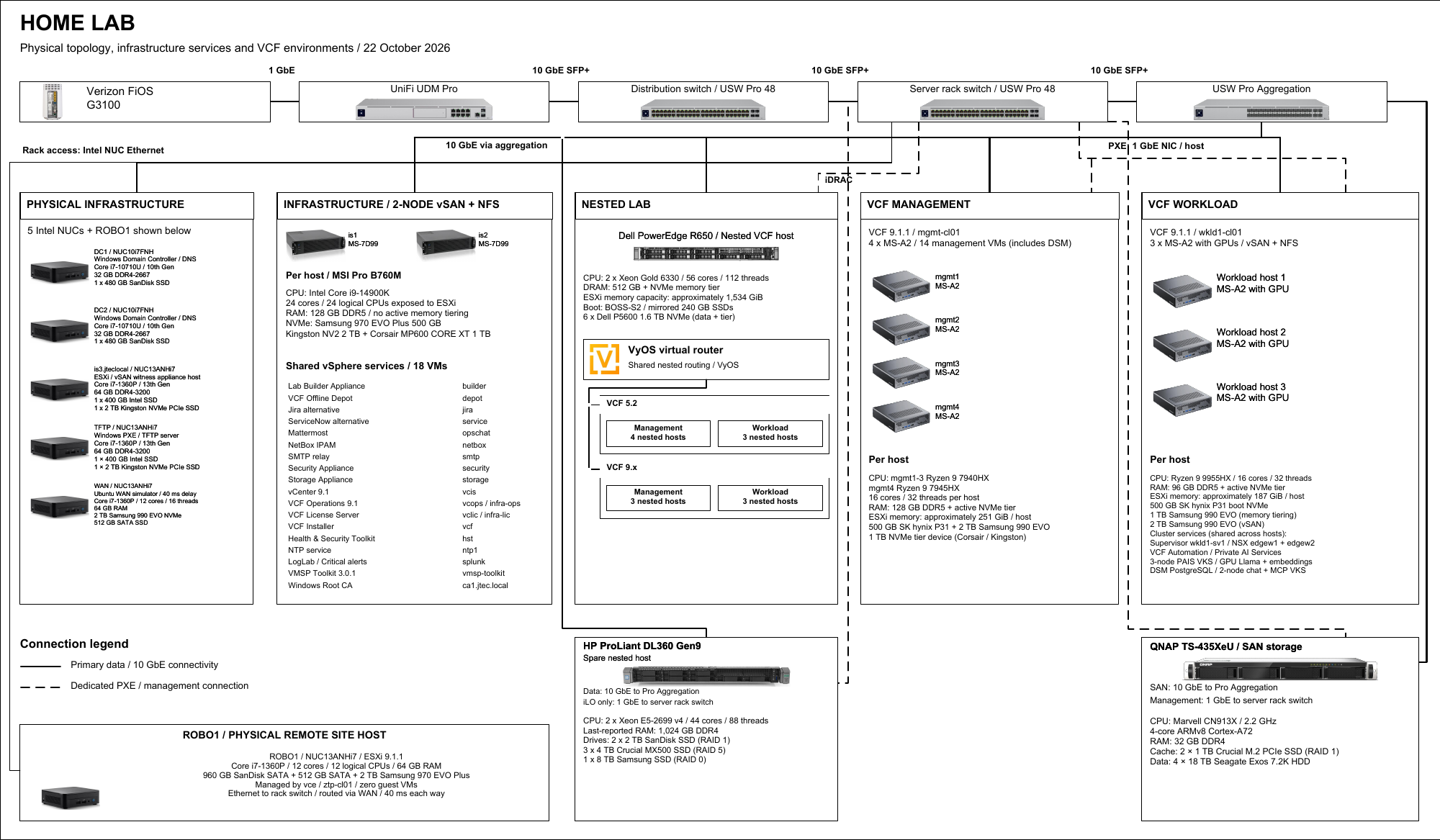
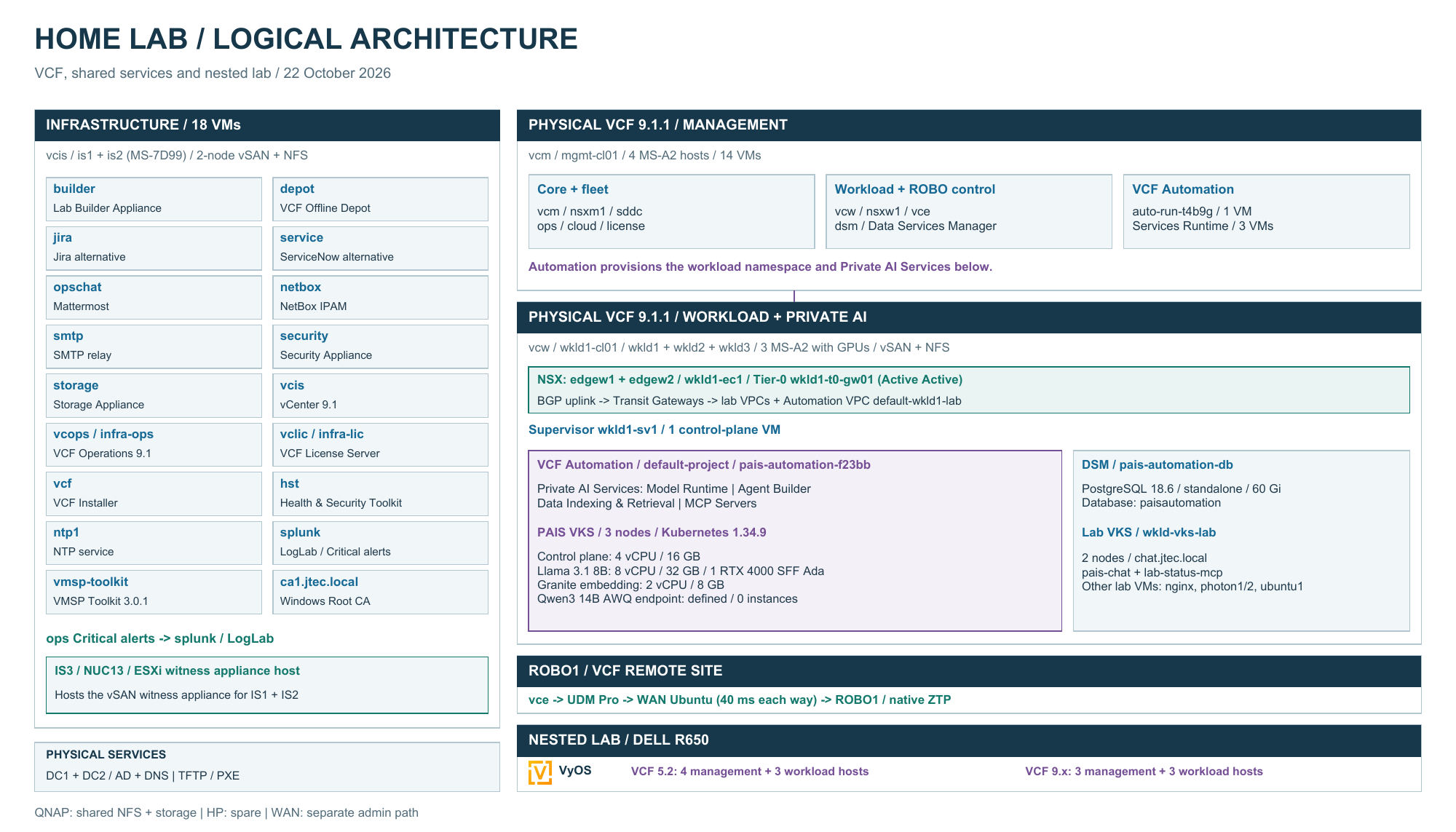
The logical diagram is a single 14-by-8-inch landscape page. The Home Lab Architecture reference page also provides both diagrams and downloads.
Why the redesign matters
The November 2025 inventory was primarily about acquiring and assigning hardware. The September 2026 design is about operational separation. Shared services can remain online while VCF domains are rebuilt. Nested releases can coexist on a dense server. Physical management and workload domains can follow different hardware profiles. PXE and management traffic have their own paths, while storage and workload data use 10 GbE.
This structure gives me a more repeatable platform for future deployment guides, upgrade testing, appliance development, GPU experiments, and VCF Operations integrations. It also makes failures easier to isolate because every major component now has a clearly defined role.
Follow the VCF 9.1.1 deployment
The management and workload deployments are now documented: start with the VCF 9.1.1 greenfield deployment and continue to the three-host NFS workload domain. Those guides describe the original deployment stages; the current physical domains now have active NVMe memory tiering, as reflected in this updated inventory. See the VCF lab guide index for the broader series.