
VMware Cloud Foundation 9 Lab: My Deployment Journey
Follow a VMware Cloud Foundation 9 lab journey covering deployment, SSO, certificates, backups, networking, upgrades and day-to-day configuration.
Start here: the VCF 9.1.1 lab
- Plan the lab: September 2026 architecture — hardware roles, shared services and network layout.
- Deploy the VCF 9.1.1 management environment — four MS-A2 hosts, NFS storage and custom networking.
- Commission the workload hosts — prepare the hosts for domain creation.
- Create the VCF 9.1.1 workload domain — three hosts, NFS storage and deployment validation.
These 9.1.1 walkthroughs use NFS. The earlier VCF 9.0 guides below include a separate vSAN ESA path. Follow the version and storage model that match your environment.
Browse all guides by topic: hardware, deployment, identity, backups, networking and management packs.
Overview
This VMware Cloud Foundation 9 lab journal brings together my deployment and configuration walkthroughs. It follows a rebuilt lab with a fresh deployment and an imported cluster, then links to the identity, certificate, backup, networking and upgrade work I documented along the way.
Earlier VCF 9.0 architecture and deployment phases
Shared lab services: DNS / NTP / Active Directory / CA / SFTP
           |
VCF fleet: Operations + Fleet Management + Identity Broker
           |
           +-- Fresh management domain
           |      +-- SDDC Manager / vCenter / NSX
           |      +-- Three-host ESA workload domain
           |             +-- Edge / VPC / Supervisor / Automation
           |
           +-- Imported infrastructure cluster
                  +-- Existing vCenter, new supporting components
Logical reading map assembled from the published walkthroughs, not a physical cabling or current-state inventory diagram. Some posts use a single-host or nested lab instead of the three-host path; do not combine those assumptions.
| Phase | What to prepare or verify | Guide |
|---|---|---|
| 1. Foundations | Hardware, address/VLAN plan, DNS, NTP and ESXi readiness. | Host preparation |
| 2. Build or import | Choose a fresh deployment or preserve an existing vCenter through import. | Existing-cluster import |
| 3. Identity and trust | Configure Identity Broker/SSO, roles and CA connections; retain recovery access. | SSO overview |
| 4. Protect the platform | Set component backups and verify recovery before expanding the environment. | Backup coverage |
| 5. Workload services | Commission hosts, create the workload domain, then Edge/VPC and Supervisor. | Workload deployment |
| 6. Consume and observe | Configure Automation organizations, Logs/Networks and collection. | Automation initial setup |
| 7. Maintain | Review release-specific prechecks, backups and upgrade order. | Historical 9.0.1 upgrade |
Here is what is listed in VCF Operations:
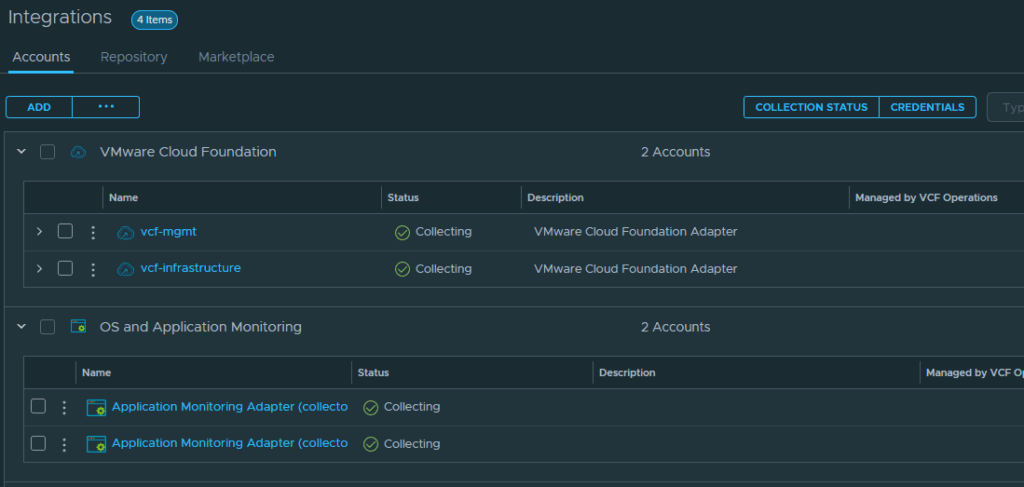
This journal includes a fresh VCF management environment and an imported infrastructure cluster. The screenshot captures an earlier stage; Automation and the follow-on configuration now have published walkthroughs linked below.
Earlier VCF 9.0 deployment and configuration
These earlier walkthroughs document the VCF 9.0 lab and its follow-on configuration. Use the VCF 9.1.1 starting path above for the newer management and NFS workload-domain deployment.
- VCF Automation deployment
- Offline depot preparation for Logs deployment
- VCF Identity Broker deployment
- Single Sign On configuration
- SDDC Manager Single Sign On configuration
- VCF Operations for Networks deployment
- External Certificate Authority configuration
- VCF Components Certificate Replacement
- ESXi Host Certificate Replacement
- SFTP Backup configuration
- VCF Backup configurations
- Host Commissioning
- Workload Domain deployment
- vCenter Linking (formerly Enhanced Link Mode)
- VCF Operations Single Sign On
- VCF Operations for Logs Single Sign On
- VCF Automation Single Sign On
- VCF Operations for Networks Single Sign On
- VCF 9.0.1 Upgrade
- NSX Edge Deployment
- Virtual Private Cloud (VPC) Deployment
- Configuring vSphere Supervisor
- Configuring VCF Automation
- VCF Operations Domain Configurations
Explore the lab by topic
Hardware and network planning
- My VCF Homelab Hardware Inventory — November 2025
- Moving My VCF 9 Lab to Six Minisforum MS-A2 PCs
- My Homelab Hardware Inventory — September 2025
- My UniFi 10GbE Homelab Network Design
- Plan IP Subnets for a VCF Homelab
- VCF Homelab Infrastructure Subnet Design
- Subnet Planning for a Nested VCF Lab
- VCF Lab Network Subnets: BGP, TEPs and VyOS
Host preparation and provisioning
- Active Directory and DNS Design for My VCF Homelab
- Create DNS A and PTR Records from CSV with PowerShell
- Custom ESXi ISOs with a Kickstart Template
- ESXi PXE Server on Windows: WDS, iPXE and IIS
- ESXi Host Preparation Checklist for VCF 9
- Deploy the VCF Installer Appliance on ESXi
- Install Photon OS on ESXi for a VCF Lab
- Publish a vCenter Content Library with Windows IIS
Physical and nested deployments
- Deploy VCF 9 on One Physical Host: Lab-Only Guide
- Prepare Virtual Switches for Nested ESXi and VyOS
- Deploy a VyOS Virtual Router on ESXi from ISO
- Deploy a VyOS OVA with VMware Tools
- Deploy VMware vSphere Foundation in a Nested Lab
- Import an Existing vSphere Cluster into a VCF 9 Fleet
- Commission ESXi Hosts in VCF 9 with vCenter
- Deploy a VCF 9 Workload Domain
- Find Deployment Tasks in VCF 9 Operations
Identity and single sign-on
- Deploy an External VCF Identity Broker
- Configure VCF 9 SSO with Active Directory
- Configure SDDC Manager SSO and Active Directory Roles
- Configure VCF Operations SSO with Active Directory
- Configure VCF Automation SSO and User Roles
- Configure SSO for VCF Operations for Logs
- Configure SSO for VCF Operations for Networks
- Configure vCenter Linking in VCF 9
Certificates and backups
- Configure Microsoft CA Integration in VCF 9
- Replace VCF Component Certificates with a Microsoft CA
- Replace ESXi Host Certificates in VCF Operations
- Commission ESXi Hosts with Custom Certificates in VCF
- Configure SFTP Backup Storage in VCF Fleet Management
- Configure VCF Backups: Fleet Manager, NSX and vCenter
- Fix LCMVMSP10035 with Windows SFTP in VCF
Networking and Automation
- Configure BGP on UniFi Dream Machine Pro for NSX
- Deploy NSX Edge Nodes in VCF 9
- Create a VPC in VCF 9: Public and Private Subnets
- Configure vSphere Supervisor in VCF 9
- Deploy the VCF Automation Appliance with Fleet Management
- Configure VCF Automation in VCF 9: Initial Setup
Operations, upgrades and troubleshooting
- Configure a VCF Offline Depot and Download Install Binaries
- Deploy VCF Operations for Logs from Fleet Management
- Deploy VCF Operations for Networks with Fleet Management
- Enable Log and Network Collection in VCF Operations
- VCF 9.0.1 Upgrade Part 1: Management Components
- VCF 9.0.1 Upgrade Part 2: SDDC, NSX, vCenter and ESXi
- NSX Edge Deployment Fails: OVF Certificate Error in VCF 9
- Stale vCenter Records in VCF Fleet Manager: Lab Troubleshooting
- Rename a vCenter Display Name in VCF Operations
Custom management packs
- Monitor HPE iLO with VCF Operations and Redfish
- Monitor Dell iDRAC with VCF Operations and Redfish
- QNAP Monitoring in VCF Operations: Setup and Troubleshooting
- UniFi Monitoring with VCF Operations Management Pack Builder